Reduce your agentic costs with Factory AI
Every organisation has a bottleneck somewhere in its SDLC. We put Factory AI, with its Missions, Software Factory and Factory Router, to the test on a real build to see what it does to the cost of delivering software.

by Byron AllenDirector

Harness. It's the new buzzword, and if you run an engineering function, you've probably been pitched one this quarter. Possibly several. Your developers likely already have a favourite, whether that's Claude Code, OpenCode or something else. The question on your desk is no longer whether AI coding tools work. It's which ones are worth paying for at scale, and what they'll really do to the cost of delivering software.
We've been asking the same question. In the last three months, Vivanti has been approached by many harness-centric tech companies. Most bring a very similar message. One message stood out to me: every organisation has a bottleneck somewhere in its Software Development Lifecycle (SDLC). Find it. Attack it. Then automate the full SDLC.
After all, he who controls the spice, controls the universe funding from the business.
That is the underlying vision of Factory, especially when you take into consideration three key components: Missions, Software Factory and Factory Router. In this post, we will articulate what those features are, tell you about the test we ran to evaluate Factory and introduce the enterprise sales perspective that complements their product in a way that is critically important for Vivanti customers.
Don't want to read that much? Here is my point of view: Factory is uniquely positioned to leverage these facets of their product and business to win against their harness peers. If I was forced to bet on one, Factory would be it.
Missions allow product engineers to step outside the SDLC
Most usage of harnesses follows a familiar loop: you prompt, the agent works, you review, and you repeat. That rhythm suits a bug fix or a single feature, but it starts to strain when the goal is bigger: a full-stack app, a framework migration, or a prototype that actually has to run.
Missions aim to address that. Instead of pushing a large project through one long, improvised session, you start a Mission with the /missions command and work through the plan with Factory's coding agent, called a Droid. This is best done with a Product Specification Document as grounding (which we discuss below), and all before any code is written. Droid asks clarifying questions, pins down constraints, and turns the conversation into a structured roadmap of features grouped into milestones.
Factory positions Missions for bounded, multi-feature projects that break down into meaningful checkpoints. It's also candid that the feature is still evolving, with open questions about whether parallel agents beat sequential execution, how to keep long-running plans accurate, and how to balance cost against quality.
As Factory iterates on those milestones, progress can be monitored with you in the loop the entire time. However, observability for an autonomous SDLC would be very useful…
Software Factory is the observability layer
As multiple Missions run across an enterprise, the burden to monitor the multiple workloads will scale up. Nobody has a single, clear picture at that stage.
Software Factory is Factory's attempt to ensure a high degree of enterprise observability. It's an always-on autonomous system that links AI agents across the full SDLC, from the moment a request arrives through triage, planning, implementation, validation, release, and ongoing monitoring. Rather than treating agents as isolated helpers, it treats the SDLC as a pipeline in which each stage can be automated and handed off to the next.
Software Factory is the control room where teams see their lifecycle laid out as a coverage map across six stages:
- Triage sorts and routes incoming work.
- Code-gen turns requests from JIRA or issue trackers into implementation sessions.
- Validate runs code review, security audits, and QA before merge.
- Release tracks deployment gates.
- Document keeps repository knowledge current through AutoWiki.
- Monitor ties incidents and agent performance back to engineering work.
Live metrics such as tickets triaged, PRs validated and merged, and incidents processed show where automation is moving work forward. Health and coverage signals show which repositories, integrations, or stages still need setup.
Software Factory is currently in Private Preview, and one we see as an encouraging step towards what enterprises are seeking.
This sounds expenshhh… let me introduce Factory Router
A key observation that many in tech have made over the last year is that AI for coding tasks is expensive. So, the sound of Missions is likely to elicit the fear of the CFO in any engineering manager. That is why the Factory Router exists.
Instead of choosing a model for each task manually, you select Factory Router once in the model picker, and it chooses for you throughout a Mission or during an individual session. It draws on a pool of frontier and lower-cost models, sends routine work to a cheaper model that can handle it, and saves the frontier models for tasks that actually need their robust reasoning capabilities.
Factory's own production numbers make the cost case. Across routed sessions from September 5 to 18, 2026, Factory reports aggregate savings of 63% compared with running the same work at frontier-model rates. The median session came in 72.5% cheaper. Roughly 84% of sessions cut costs by at least half, and about one in three were at least 80% cheaper.
Factory's side-by-side example shows where the savings come from. A simple request like resetting a password costs $0.84 on Claude Opus 5 but about $0.09 when routed to a lighter model.
Cheaper doesn't have to mean riskier. If a routed model gets stuck, Factory Router moves the session to a more capable one. It also fails over between providers when one degrades, which Factory says delivers 99.9%+ request reliability.
Our experience building with Factory
With the above in mind, we wanted to test Factory's claim to enable an autonomous SDLC. To get a good sense of that we leant into the concept of a Mission, for which we had a strong test candidate: a newly developed roster optimisation system.
The roster optimisation tool (RO) we developed helps professional service firms (Vivanti in the first instance) match demand (e.g. sales opportunities and active engagement extensions) against supply (e.g. the current talent pool plus confirmed new joiners), so that staffing decisions are made from a single, current view rather than from disjointed spreadsheets and tribal knowledge.
The most recent iteration of our RO was a re-envisioning of the approach. Initial discussions were held around 21 July. A month later we had a strong MVP with contributions from one core developer, one part-time AI engineer, one part-time solution architect and a product owner. In our consulting terms, we would roll this up into 2 engineering consultants plus oversight, so roughly 2.5 people for about four weeks.
To produce a fair comparison between this team, with their knowledge on 21 July, and Factory, we developed a Product Specification Document (PSD) derived from the information we initially collated on 21 July. Using the PSD as grounding for the test Mission, we let Factory rip.
Missions initialise with a series of questions, which we found to be thoughtful - exactly what you would want from an engineering team developing an MVP that balances ability to scale with being pragmatic. To be pedantic though, we chose to be pragmatic, whereas Factory also gives you the option of a more focused, one-shot type approach.
After completing that initialisation process, 11 milestones were generated and off it went, for three weeks, iterating through each component of each milestone. If three weeks sounds too long, that's because it was. I started off using Factory's CLI rather than their App, which would have removed or minimised Mission-pausing, so it was likely closer to two weeks.
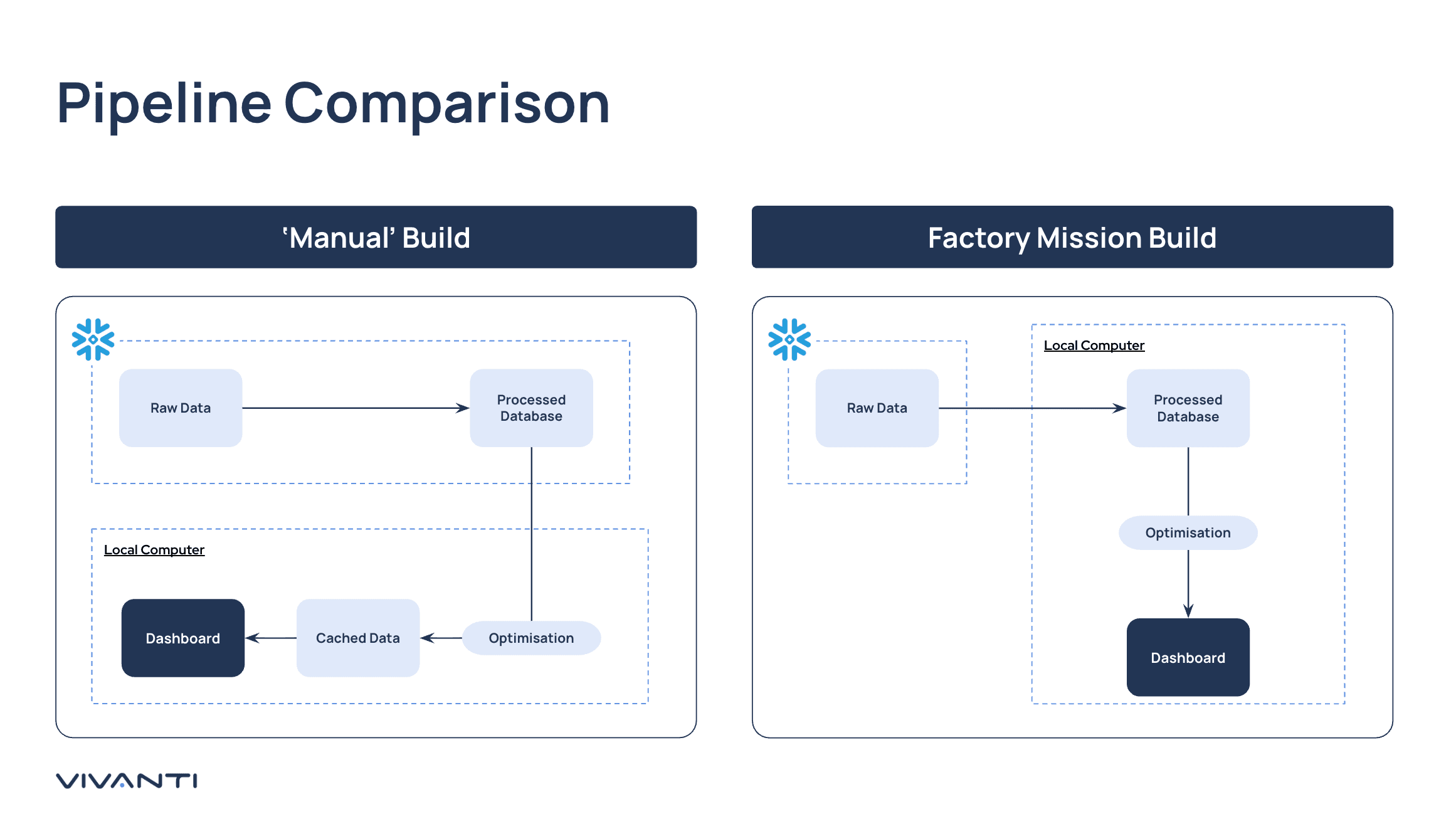
The initial post-Mission code was insightful, functional and different to what we had produced. The Factory build is 100% functional and usable, including charts we did not consider but which are more fitted to the use case. In contrast, there are aspects of it that do not hit a high note around UX.
| 'Manual' Build | Factory Mission Build | |
|---|---|---|
| Database processing | Data engineering happens on the Snowflake server. We took advantage of Snowflake and its compute pool to pre-process the data, chosen to maximise speed. Dashboard data is cached locally once computed. | All computation happens locally, with recalculation every time the dashboard is loaded. No change can be made to the remote database. This was an active choice by us to minimise data leakage, as at the time we only had access to APIs not under an Enterprise agreement (a tradeoff to get going). |
| Backend | Used the semantic understanding of an LLM to assess consultant skillsets and cached the result for faster computation. Skills were then matched to order requirements using CP-SAT optimisation based on the company's internal allocation rules. | Consultant skills were computed using keyword matches to save local computing time. CP-SAT optimisation was used with a tuneable weighted loss function for generalised business rules. The weights can be tuned to specific business requirements. |
| Frontend | Single dashboard that focuses on consultants and the delivery plan, with a toggled view for details (e.g. engaged consultants). | Multiple dashboards covering consultants, delivery plan, reporting, settings and data quality. |
| Build time and resources | 4 weeks with 2.5 resources | 3 weeks with 1.5 resources |
Unless developers are being exceptionally cost conscious (which they are typically not without quotas), frontier models become the default. During this Mission, Factory limited frontier model usage, leveraging open weight models in 13.9% of sessions and cheaper closed models 66.5% of the time.
Making a Mission pay off
The most counterintuitive thing we learned is that autonomous agents make upfront design more important, not less. The popular advice is to skip wireframes and prototype straight in code, because code is now cheap. A Mission changes that maths. On a normal engagement, a wrong assumption gets caught at the next client check-in. In a Mission, the agent builds on that assumption for eleven, twelve, or more milestones. Changing a wireframe takes an afternoon.
Before the Mission. Agree wireframes with stakeholders and include them in the specification. Set up a semantic model of your data, route the agent through your AI gateway, and make data-access decisions up front. Our build recalculates everything locally because of a restriction we imposed, and the agent designed around it. Run long Missions in the Desktop App, not the CLI.
During the Mission. Treat milestones as stakeholder checkpoints to restore the steering our test lacked. Review at milestone boundaries, not continuously, because watching the agent work kills the parallelisation benefit. Meanwhile, put your people on what the agent does worst.
After the Mission. Budget for closing the gap. We needed a week of human effort to review and harden the generated code, and it belongs in the plan from day one. Done this way, one engineer can steer a Mission while the rest of the team works on the next big thing. Done badly, that engineer becomes a full-time babysitter, and you end up paying for both the tokens and the salary.
Adding our own controls
On reflection, we would also have used our own internal AI Gateway to avoid data leakage. This would have allowed a more apples-to-apples comparison. It is worth noting that using your own internal AI Gateway is not an anti-pattern on Factory, as you can map your models to the models used by Factory Router. This is enabled by the bring-your-own-key / model approach, which can include a LiteLLM key.
Additionally, we would have ensured a semantic model representing the tables was part of the upfront build. We were keen to see Factory perform without it, but on this point it is like most LLMs, requiring a semantic view to traverse primary and foreign keys.
Ultimately, Factory allows you to parallelise your developers' time. In our case, it freed up 2.5 people for a total of two weeks. We think you can improve on this number, but you do need to be clever about how you do it, otherwise you might find yourself refactoring more than you would like.
Bottom line: Factory can absolutely reduce your total greenfield build cost. Given the initialisation protocol and outputs we observed, this might be particularly true for migrations.
Let's talk about sales and working backwards
Most harnesses are sold like developer tools: sign up, add a card, figure it out yourself. That's fine for an individual. It doesn't work when you're trying to change how a whole engineering organisation delivers software.
At that scale, you need a vendor who starts from your problem rather than their product. That means someone who asks where your SDLC is really bottlenecked, works backwards to what should be automated first, and is honest about what won't work.
It's a two-way commitment. You put in time, access and internal sponsorship. They put in people, attention and a real stake in whether it succeeds. That shared accountability is what a proper enterprise sales team provides, and it's what turns a pilot into a programme.
Factory has invested in exactly that kind of partnership with Vivanti.
Written byByron AllenDirector